
Usage and billing
Read usage, budgets, balances, invoices, and billing readiness in the authenticated app.
Before you begin
Know the workspace and billing owner. Use the public pricing reference for plan terminology and the app for current usage or payment state.
What you will see
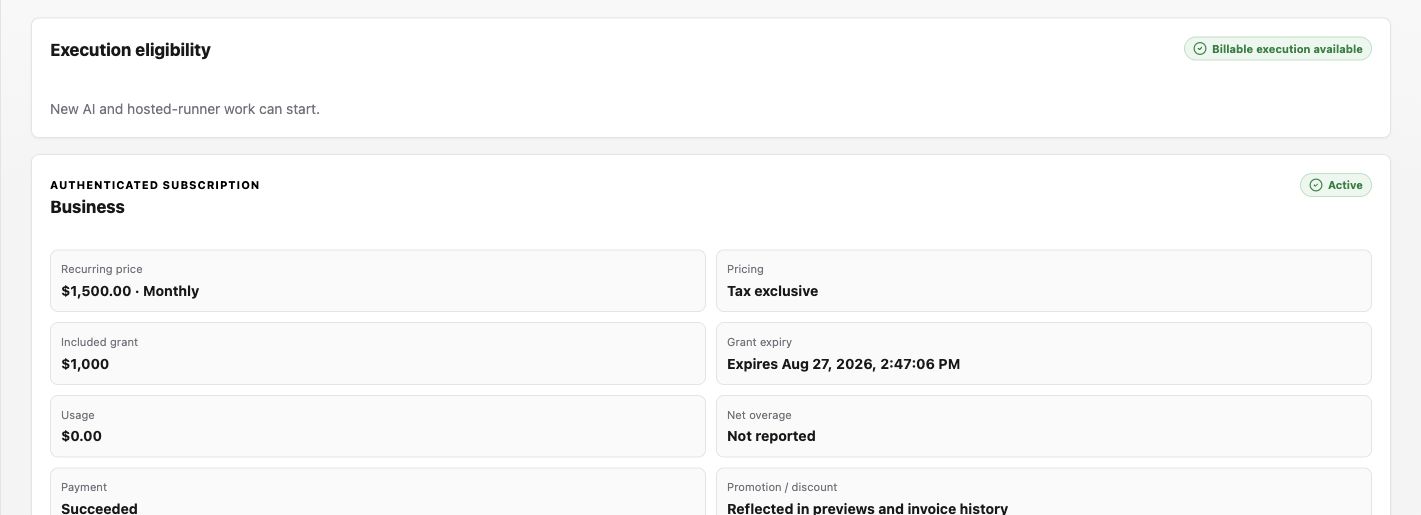
Open Settings > Billing & Security > Billing. The first cards answer two different questions: whether new billable execution can start and which subscription is active.
Procedure
- Read Execution eligibility first. Billable execution available means new AI and hosted-runner work can start; follow the displayed recovery message for any blocked state.
- Review the authenticated subscription card: plan, recurring price, included grant, grant expiry, current usage, payment state, and renewal.
- Check Current month usage, Budget consumed, Balance available, and Runner network charges.
- Review Budget status and its reporting period before comparing a total. When authorized, enter a Soft-alert threshold and select Save threshold.
- Use the plan action offered by the catalog, then review the protected handoff before confirming anything:
- Start checkout begins a Sandbox-to-paid transition.
- Resume checkout continues an incomplete checkout.
- Preview change shows an eligible paid-plan transition before submission.
- Use Payment readiness, Payment instruments, and Invoices for billing handoff and history. Never paste card or provider identifiers into support messages.
Example review
Suppose a team wants to increase its automation frequency. Record these values before changing anything:
Recheck the same cards after the first higher-frequency run. A higher catalog allowance does not itself prove that a plan change was submitted.
Expected result
The selected workspace, reporting period, plan, and totals agree with the intended billing scope. A saved alert shows the updated current threshold. Start checkout or Resume checkout opens the protected checkout flow, while Preview change shows a reviewable paid-plan transition. A plan change is complete only when the app reports the resulting subscription or a pending change; closing a preview or checkout leaves the plan unchanged.
Permission guidance
Usage visibility, budget changes, billing setup, and invoice access can belong to different roles. Ask the billing owner when the app directs you to do so.
If usage looks wrong
Symptom: a summary or budget does not match expectation. Likely cause: reporting period, workspace scope, or metering delay differs. Safe recovery: confirm filters and period in the app, wait for the visible refresh, and contact the billing owner if it remains inconsistent.